What I’ve Been Doing at 20:15 (8:15 PM) – February 2015

Here is the next installment of what I have been doing at 8:15 PM for the month of February. Here’s my post from January, 2015, of what I’ve been doing at 8:15 PM.

Little Background

Started keeping track of what I was doing at 20:15 (8:15 PM) every day for the last month after reading Kitt Hodson’s Pastry Box article from Jan 1, 2015. Which was about how a year earlier she read Erica Douglass’s article about writing down what she did at 11:11 AM and 20:14 (8:14 PM) everyday.

I thought this was a great idea to see if I could find any patterns in my nights. So far I tend to watch TV Monday, Thursday, and Sunday nights when I’m home. Also on the weekends I tend to be leaving or coming back from dinner, sometimes even eating dinner.

February

Feb 1 – Watching Katy Perry perform at the halftime of Super Bowl XLXI, along with catching up on Twitter. Nothing exciting going on as of yet with the game tied at 14 to 14. With Seattle scoring with six seconds before the half against New England.

Feb 2 – ENTERED 2015/02/3 – Watched 2 Broke Girls after making updates to my Performance slides. Then last night cleaned up a few 100 e-mails with more work to do.

Feb 3 – Sitting in Barnes and Noble drinking a large Starbucks hot chocolate with whipped cream while looking through magazines. The magazines were Communication Arts magazine, along with: Entrepreneur, Inc, Jamie (Oliver’s), and Fast Company magazines.

Feb 4 – Installing Dragon Naturally Speaking on my Windows 8.1 PC, while cleaning up my e-mail. Busy day working on more APIv2 issues, along with creating a draft of e-mail sent to users.

Feb 5 – Talking with Corey, Emily, and Marisa about the design after the Dribbble DC event were a guy from Gannett talked about using the Oculus Riff. Spent the day reviewing ODEP PDF and UX for APIv2.

Feb 6 – ENTERED 2015/02/16 – Had Pho at Pho Viet Flare so was either there or heading home from there to watch Tree Masters. For some reason, this entry got skipped or deleted from Simple Note while using it on my phone.

Feb 7 – Attempted to install Turbo Tax on my MacBook and found out I need to have OS 10.7 or higher to install, and I only have OS 10.6. Glad I have my PC, which has Windows 7. Also working on my 2015 THEME blog post about a HEALTHIER ME. Visited my local coffee shop (St. Elmo’s). Did some reading, napping, and next TV, and dinner.

Feb 8 – Watching Anthony Bourdain’s the Layover in Toronto. After a day of seeing the movie “The Theory of Everything”, Pho at Pho 75 in Arlington, VA, taking a nap, and a getting 3.41 mile walk into Old Town down King St.

Feb 9 – Listening to Ali, Max, and two others talk about getting into UX, what they do, what they are looking for in a new hire at General Assembly DC. Most of the day was spent looking at PDF issues and closing out issues in GitLab.

Feb 10 – At Clarendon Apple Store looking at 13″ Retina MacBook Pro to replace my old White MacBook. Played around with the Notes and Pages, along with Mac Word 2011 to see if the files created were accessible. A long day of checking eight or 10 PDFs and other documents at work.

Feb 11 – Laying in my bed looking at the days Twitter after reviewing PDFs and attending two meetings. Then spending the afternoon teaching Compliance Sheriff class, along with my “Is Your Website Accessible?” talk and other accessibility issues at a work agency.

Feb 12 – Writing up notes for the four websites Viget Labs asked to check for the talk on Friday. Next need to check the home page with JAWS to see how things read and what is going on with the extra accessibility navigation thing. Another busy day checking documents.

Feb 13 – Finishing up Pho at Pho Viet Flare on Van Dorn or heading home from there. Stopped at Sugar Shack for donuts. Had a good day at Viget Labs talking accessibility with their team in DC, Raliegh, NC, and Boulder, CO.

Feb 14 – Eating roast pork Bahn Mi sandwiches while watching “Dinners, Drive-ins, and Dives while waiting to watch mid-season finale of MythBusters. Got cars oil changed, then over to St. Elmo’s, home to read then out to Pho 75 with Sam and Eric. We then went to Super H Mart for meat to add to tomorrow’s soup with a stop at Banh Mi DC Sandwich.

Feb 15 – Sitting in Buzz Bakery with two 9:30 cupcakes to go after a busy day. Went to Hoffman 22 to see the five Oscar-nominated shorts films, along with the ten or so nominated animated shorts films and runners up. Then it was off to St. Elmo’s to read with a cup of hot chocolate. Then to Dairy Godmother for a quart of salted caramel custard and then drive to Mt. Vernon before dinner at Momo (sushi).

Feb 16 – Watching 2 Broke Girls on a relaxing Presidents Day holiday. Spent day reading, napping, and trying to come up with a better way to have multiple skip navigation links on Craig’s Hospital. Having an issue with the width of the container, which I’m thinking is getting style in JavaScript. Plus, waiting to see how much snow we get tonight and wondering if work will be canceled or have two hour delay.

Feb 17 – Back to reading “A Day at elBulli” by Ferran Adria. Currently, read page six of the “Creative Methods I” lime green section of the book which is between pages 136 and 137. The Federal government was closed today because of snow (three to four inches at my house). I ended up shoveling a few driveways (mine and end of neighbors after plow came through) for an hour and a half to two hours. Then it was time to watch “Gift of Business chat with Amy Hoy, Alex Hillman, and Brenan Dunn after that was a late lunch of Pho at Pho Viet Flare. I  dropped my car at Landmark Honda to get an oil pan gasket fix before hopping a bus to King St. metro station and walked home from there.

Feb 18 – Watching an old episode of “American Pickers”. Reviewed a half a dozen PDF’s on first day back after a four day weekend because yesterday was a federal government snow day.

Feb 19 – ENTERED 2015/02/20 – Listening to Kaytee Nesmith talk about the UX of crypto applications. These applications can make life safer for those in danger or sources for articles at nclud as part of February’s Refresh DC event.

Feb 21 – Driving Sam and Eric home after dinner Ray’s the Steaks with William, Anthony D Paul, Samantha, and a few others. Had the hanger steak with mashed potatoes, wild mushrooms, and bone marrow, along with steak tar tar, horseradish, and capers in deviled eggs.

Feb 20 – Leaving Caphe Banh Mi where I had a small house Pho (eye round and brisket with beef broth) with extra noodles. While sharing part of my table with six women out celebrating two of their 50th birthdays. That was fun getting asked a bunch of questions while eating from slightly drunk women. Say of APIv2 meetings about UX and accessibility issues.

Feb 22 – Eating a roasted pork Bahn Mi while watching to Oscar pre-show on ABC. Slept in and did a bit of snow removal so when it freezes tonight it would be an ice rink. Then went to Pho 75 for a small bowl of #10 (eye round and fatty brisket). Next grabbed Bahn Mi, chocolate chocolate cupcakes (Doom) from Baked and Wired, along with breakfast tacos for a mid-afternoon snack.

Feb 23 – Its Monday night so watching 2 Broke Girls like most weeks. Talked with my brother James earlier who called for my birthday a day early. Spent the day dealing with APIv2 with Daniel and figuring out more issues with Token and Datasets.

Feb 24 – Again finding time to read “A Day at elBulli” by Ferran Adria on my 52nd birthday. I’m in the middle of the history of the elBulli section, which are the tan pages between pages 184 and 185. Finished the history up until 1997. After I’m done with the history section, it’s off to grab Pho at Caphe Banh Mi in old town Alexandria and bring it home.

Feb 25 – ENTERED 2015/02/26 – Was catching up on “American Pickers”. Needed to unwind after a day of reviewing PDF’s.

Feb 26 – Watching “Big Bang Theory” after running to Burke and Herbert Bank to pay my rent, then to eye doctors to pick up my new glasses. Next off to Barnes and Noble to pick up “Great Discontent” and “Lucky Peach magazines. Finally, stopping at South China to grab Mongolian Lo Mein after a long day checking PDF’s after a two-hour snow delay.

Feb 27 – Flying to SFO for Bay Area Accessibility Camp at LinkedIn in Mountian View, CA. Currently, over middle America somewhere between the western side of Iowa and eastern side of Nebraska. I’m sitting next to Nguyet and Doug how are headed to Sonoma Valley for a few days.

Feb 28 – Sitting in Agave Mexican Bistro with a dozen or so accessibility people after a great day at Bay Area Accessibility Camp at LinkedIn in Mountview, CA.

Conclusion

After re-reading these entries, I have notice how much I have done over these few months. Some of it productive and other times recharging the batteries. I also at some point in my writing down of events started adding in how the day went, what happened, what I planned to do later, and I was thinking.

In the future, I plan to post this information once a month at the beginning of the following month.

Hopefully, this has been helpful to you and gets you to keep track of what you do a particular time of the day, along with a short daily diary.

If you want to meet up to do something exciting at 8:15 PM some evening, please leave a comment. Or a suggestion of something that is not part of my ordinary life you think I should do.

 

Posted in 2015, 8:15 PM, February, What I've Been Doing | 11 Comments

What I’ve Been Doing at 20:15 (8:15 PM) the Last Few Months

Started keeping track of what I was doing at 20:15 (8:15 PM) every day for the last few months after reading Kitt Hodson’s Pastry Box article from Jan 1, 2015. Which was about how a year earlier she read Erica Douglass’s article about writing down what she did at 11:11 AM and 20:14 (8:14 PM) everyday.

I thought this was a great idea to see if I could find any patterns in my nights. So far I tend to watch TV Monday, Thursday, and Sunday nights when I’m home. Also on the weekends I tend to be leaving or coming back from dinner, sometimes even eating dinner.

Below I was going list all the things I have been  up to for the past month at 8:15 PM, but realized it was going to be over 6,500 words so will be posting February, March, and April entries over the next week or so. Some days I didn’t enter the information into my phone (SimpleNote application) until later that day or the next day because I was spending time with others and didn’t think it polite to stop right then to write what was happening. On those occasions I made mental note and did it later. Sometimes you will see “ENTERED – YYYY/MM/DD” after a date that notes when I entered the information.

January

Jan 1 – N/A – Hadn’t started yet.

Jan 2 – Writing bills, rent check, and fixing checkbox alignment CSS.

Jan 3 – Watching Edward Lee in the third season of “Mind of a Chef” (video) on DVD. While he is talking to Andy Ricker of Pok Pok, and I’m eating cured meat and cheese sandwich on a great baguette.

Jan 4 – Again watching the second season of “Mind of a Chef” on DVD with Sean Brock (video). While he is talking with Edward Lee about making Korean BBQ and using Carolina Gold rice, and I’m eating cured meat sandwich on a great baguette.

Jan 5 – Watching “2 Broke Girls” and then it’s time for dinner before doing work on the INPUT field outline examples pages. This TV watching thing needs to change sooner than later.

Jan 6 – Updating WordPress: plugins, themes, etc. and looking through spam comments to see if and are good, along with looking at my draft folder to see if anything is ready to post.

Jan 7 – Working on making two different text versions of an organization chart one using a definition list (DL) and the other using heading structure to convey who and what groups fall under what. Going to convert work example to be Geeks Love Wine related example.

Jan 8 – Watching “The Big Bang Theory” and starting to outline the FOCUS on INPUT blog post, along with one about a possible better way to display an organizational chart with text.

Jan 9 – Watching American Pickers and Dinners, Drive-ins, and Dives while waiting to go to District Taco for fish tacos closer to 9 PM.

Jan 10 – Watching the beginning of the Carolina Panthers and Seattle Seahawks NFC Divisional football  game.

Jan 11 – Taking a break from working on responsive TABLE example, while also doing laundry.

Jan 12 – Working on making fixes to the responsive TABLE example, so the footer doesn’t end up showing a horizontal scroll bar while listening to the Stick Mob’s “Drive West All Night”.

Jan 13 – ENTERED 2015/01/14 – Was attending WordPress DC and listening to Anthony D Paul on “How to Create a Website Using WordPress on Your Cellphone”.

Jan 14 – Purchased CSUN tickets and now checking the weather for a trip to Cleveland for a long weekend and then booking the hotel for now at least.

Jan 15 – Looking at plane tickets from DCA to SFO and then SAN to DCA, while updating my responsive TABLE example to use other data than work dataset data that I first made it with.

Jan 16 – ENTERED 2015/01/16 – Driving to Cleveland, OH, to go see the Ferran Adria “Creativity” exhibit at the Museum of Contemporary Art Cleveland in Cleveland Heights, OH.

Jan 17 – Watching Barrett-Jackson car auction while waiting for the Mythbuster’s “Indiana Jones Special” in Cleveland, OH. Drove from DC to Somerset, PA, with a side trip to see Kathy and Nicolas Chugh at his swim meet in Canton, OH, next to Pro Football Hall of Fame.

Jan 18 – Ordered a few of Ferran Adria book ( add book names ) after attending Ferran Adria’s “Notes on Creativity” at Museum of Contemporary Art in Cleveland. After spending three hours at Cleveland Museum of Art. Had dinner at Eric Meyer’s house.

Jan 19 – Relaxing by watching 2 Broke Girls after driving home from Cleveland that took over eight hours instead of the six I expected it too.

Jan 20 – Watched TV while getting rid of slight headache and queasy feeling after having to wear broken glasses all day. Glasses frame broke yesterday and got an older pair as a backup pair so current lenses would fit into them until I can get newer ones, along with the new prescription.

Jan 21 – Starting to read “A Day at elBulli” to see what Ferran Adria’s creative thought process, along with he and his staff go through in a day to serve dinner to about 50 people.

Jan 22 – ENTERED 2015/01/23 – Was driving to Taco Bamba to have tripe, tongue, and el pastor tacos before meeting the Deque group at their hotel in Dulles.

Jan 23 – ENTERED 2015/01/24 – Was having dinner with Glenda “the Good Witch” Sims (Twitter), along with fellow Deque employees Dian and Jeneen and then Sam at Hyatt Dulles. We headed up to Glenda’s room for wine and more conversation once dinner was done.

Jan 25 – Watching the Screen Actors Guild Awards after a day at the movies watching “The Imitation Game” and “Birdman”.

Jan 24 – Again reading “A Day at elBulli” by Ferran Adria about their process of creating dishes and how learning a technique for one thing can help when creating something else later on. This afternoon went to Sugar Shack on their grand opening day to try their donuts which are great from the one I have eaten so far, plus had Pho at Pho 75 with extra noodles for dinner.

Jan 26 – Watching “Trip 2015” on Travel Channel, which I’m guessing is a big ad for each of the companies being shown. Then during ads need to update nephews soccer website with requested changes. Loads of fun at work with meetings and PDF reviews.

Jan 27 – Started the first draft/outline of my “Healthier ME” blog post (never finished), which I’m currently explaining last year’s theme. Next need to explain why I’m looking to improve my health. I’m listening to “The Stick Mobs” who are from the DC area. It’s getting difficult since I had no breakfast and a small lunch. Need dinner soon. I’m thinking South China takeout.

Jan 28 – ENTERED 2015/01/29 – Looking at the AT&T accessibility jobs and decided not to apply, since not sure what I want to do for work. Am I going to do more coding or UX?

Jan 29 – Talking with the Army .MILers old and new at Refresh DC (Twitter) after listening to Megan Zlock talk about the differences between the CMS Craft and WordPress.

Jan 30 – Sitting in Pho 75 with Sam and Eric ordering a small round eye and fatty brisket with extra noodles. A day spent using JAWS on two PowerPoints and entered 20+ issues into GitLab.

Jan 31 – Laying on my bed listening to Hot Jazz Saturday on NPR while reading twitter after a long day of shopping with Sam. We went to Sam’s, Wegmans, Super H Mart, and Banh Mi DC Sandwich.

Conclusion

After re-reading these entries, I have notice how much I have done over these few months. Some of it productive and other times recharging the batteries. I also at some point in my writing down of events started adding in how the day went, what happened, what I planned to do later, and I was thinking.

In the future, I plan to post this information once a month at the beginning of the following month.

Hopefully, this has been helpful to you and gets you to keep track of what you do a particular time of the day, along with a short daily diary.

If you want to meet up to do something exciting at 8:15 PM some evening, please leave a comment. Or a suggestion of something that is not part of my ordinary life you think I should do.
 

Posted in 2015, 8:15 PM, January, What I've Been Doing | 12 Comments

Canceling Accessibility Camp DC for October 11, 2014

After much thought and discussion, we are canceling Accessibility Camp DC on October 11, 2014.

We hope this does not cause too many people grief because they have already booked airfare and hotels to attend the event. I notified those I knew who were attending from out of town that we might have to cancel the event.

For those still coming to DC because you purchased airfare and hotel, we can still get together and talk abut accessibility. We could even have a wine and cheese tasting at my house, along with sightseeing if you want too.

A big thanks to our sponsors. I will look into the fastest way to get you your money back. It might take a bit with EventBrite, but I will figure something out.

Thanks for all those that did register and planned on attending camp.

We are looking into the possibility of re-scheduling the event for a later date. Most likely, the event will be in January or February of 2015.

Posted in Accessibility, AccessibiltyCamp, AccessibiltyCampDC, BarCamp, Martin Luther King Jr. Library, Washington, DC | 2 Comments

Simple Accessibility Updates to Improve New York Times New Redesign – Part 2

For those following along, this is Part 2 of my series on how the New York Times can make simple updates to improve their website’s accessibility. “Part 1 – Simple Accessibility Updates to Improve New York Times New Redesign” is available for those who missed reading it.

Reminder: I’ve written these posts to help to the New York Times, along with anyone with large websites, or those who are designers or developers, etc., to show that simple incremental changes can improve their website in the long run.

In this post, I will cover the following accessibility issues with the New York Times home page:

  • Missing skip navigation
  • Difficultly seeing visual cues for those only using the keyboard
  • Poor color contrast
  • Not able to use video player by keyboard only
  • No captioned videos for individuals that are deaf or hard-of-hearing

Adding Skip Navigation

Skip navigation allows people that use a keyboard or assistive technologies like screens reader JAWS, NVDA, VoiceOver, etc.) to bypass large sets of links and focus on the content. Unfortunately, the New York Times pages are missing skip navigation, which means that screen reader users must listen to all of the preceding content before getting to the main articles.

Adding skip navigation to your pages is fairly easy as shown in this article on my blog called “Are You Using Skip Navigation?”.

You can choose between a few different techniques to hide your skip navigation depending on what your design team or marketing department want. Here are a few articles about skip navigation:

Note: These websites have additional accessibility articles you might want to read when you have the time.

An example of skip navigation can be found on my main website (press TAB to see the “Skip to Main Content” link at the top of the page). I haven’t yet updated my blog’s WordPress theme to include skip navigation.

Visible 'Skip to Main Content' link on jfciii.com website

Thinking About Color Deficiency (Colorblindness)

Approximately 8% of the population (mostly male) has one of the three main types of colorblindness (deuteranopia, protanopia, and tritanopia). This, along with small text, might make it difficult to read parts of the New York Times homepage.

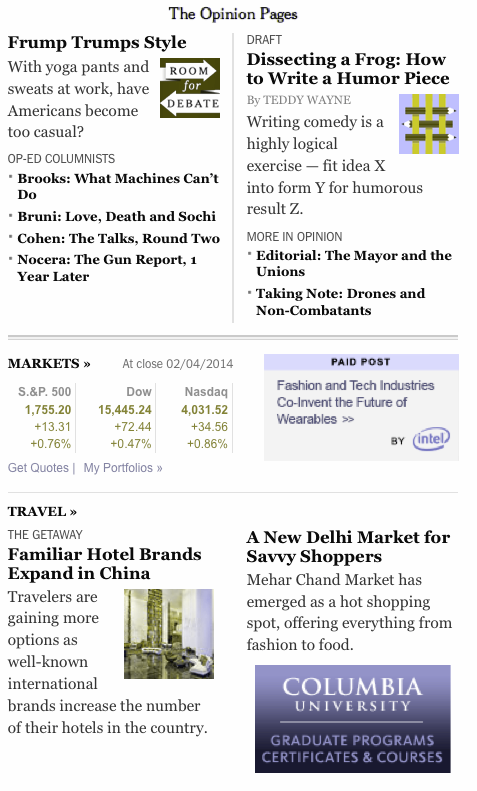
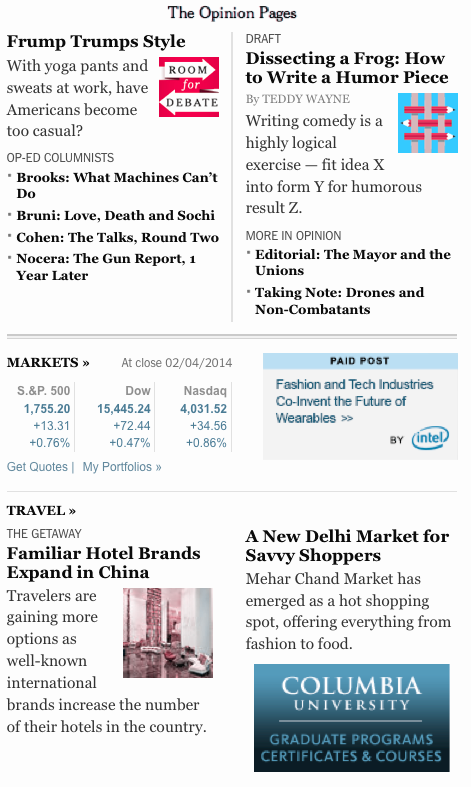
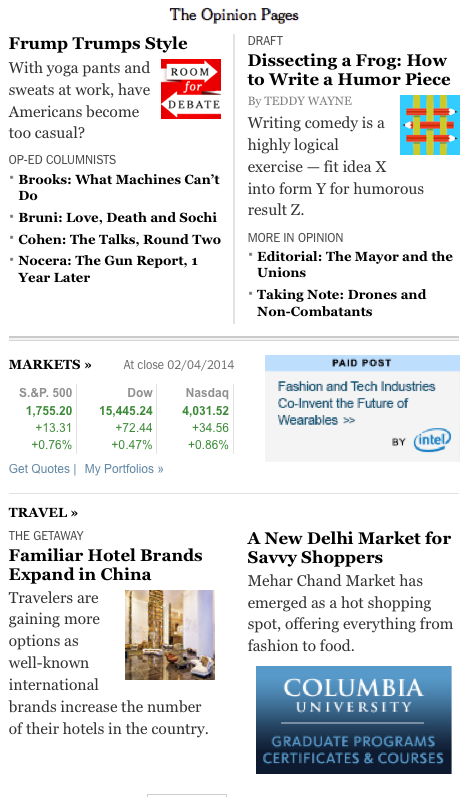
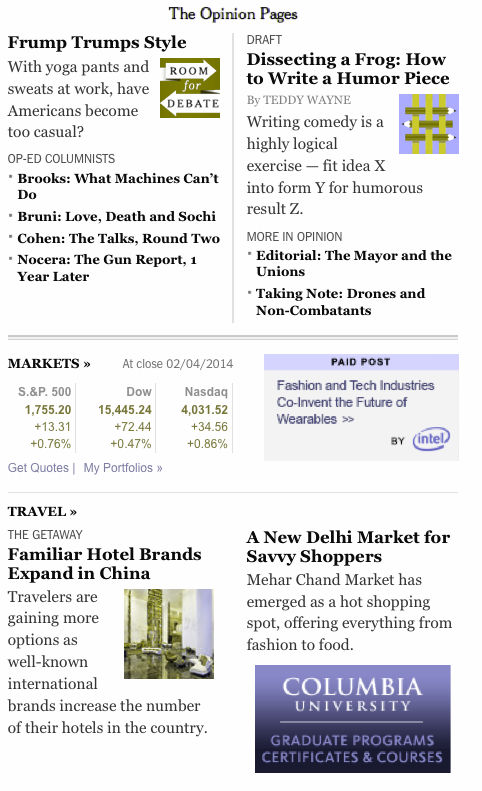
The following examples demonstrate what people with normal vision see as compared to the three main types of colorblindness:

The opinion page section with now colorblindness mask added

Normal vision

Deuteranope colorblindness mask added to the opinion page section

Deuteranope (a form of red/green color deficit)

Protanope colorblindness mask added to the opinion page section

Protanope (another form of red/green color deficit)

Tritanope colorblindness mask added to the opinion page section

Tritanope (a blue/yellow deficit- very rare)

To help people who are colorblind, the New York Times needs to verify the color contrast ratios.

Analyzing Color Contrast

For those who have low vision, poor eyesight, or colorblindness, some of the text on the New York Times home page could be difficult to read. An example would be the bylines to their articles.

New York Times feature article bylines

Bylines from New York Times feature articles on home page

If you were to use one of the many check color contrast tools, such as Jonathan Snook’s “Colour Contrast Checker” you input the foreground (font/text) color and the background color to see if it passes WCAG 2.0 standards:

  • Level AA: contrast ratio of 4.5:1 for normal text and 3:1 for large text
  • Level AAA: contrast ratio of 7:1 for normal text and 4.5:1 for large text

You can be get the hexadecimal numbers from Photoshop (designers), or by right clicking the text and having the Firefox plug-in FireBug (developers). In this case the CSS is:

.NYT5Style .byline { color: #808080; font-size: 10px; line-height: 12px; margin: 4px 0 2px; }

The screenshot shows the Colour Contrast Checker after I added the CSS from one of the home page bylines. As you can see, the foreground color #808080 is a light gray, which has inadequate color contrast on a white background with a ratio of 3.95.

New York Times poor byline color contrast show on Jonathan Snooks colour contrast tool
Another reason it might be difficult for others to read the byline is because the font size is only ten pixels (10px). I recommend that the font size be no smaller than 12 to 14 pixels (12px to 14px) depending on font choice. The font Arial at 12 pixels (12px) is smaller than Helvetica at 12 pixels (12px).

Some of the more popular color contrast checkers/resources are:

Providing Visual Cues for Keyboard-only Users

It is difficult to see where you are (that is, which links are active) when tabbing through the home page. One way the New York Times can fix this is by adding “:active” (IE browsers) and “:focus” (for all other browsers) in the CSS to the elements that include “:hover.” Then, when you tab, the links are indicated (in this example, with an underline).

Here are the current and updated examples of the CSS:

Current CSS

a:hover { text-decoration: underline }

Updated CSS

a:hover, a:focus, a:active { text-decoration: underline }

Making the Video Player Keyboard Accessible

Keyboard-only users cannot play, pause, enlarge the video to fill the entire screen, or change the volume.

A friend who works in the accessibility field asked if I knew of any way to make a YouTube player keyboard accessible for a .gov website he and his team were working on. I told him how Derek Featherstone and his team had used YouTube’s API to create their own links to play, pause, etc. the video by using JavaScript and CSS to place the links over the inaccessible ones. Due to time constraints, my friend and his teammates added an additional set of controls below the video, which did the trick of making the video player accessible.

Captioning Videos

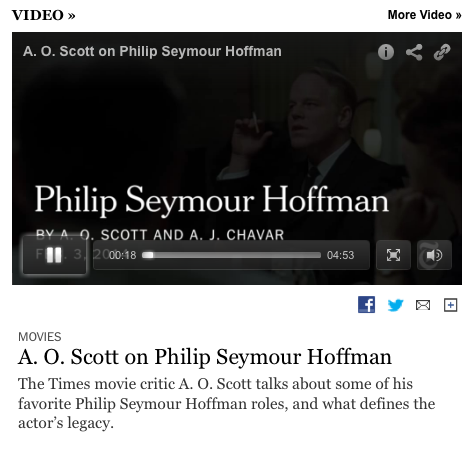
I looked at several videos on the home page, and none of them had captioning. Lack of captions can make following, along with the video difficult for those that are deaf or hard-of-hearing .

Solve this problem by getting the videos captioned. Many services are available that will caption your videos for a price. The quality of the captioning somewhat depends on how much money you have to spend.

No captions for this video and no ability to turn them on if they were available

No captions available

Another solution is to take a transcript, if available and use captioning software that will split the text/captions at the correct places.

Conclusion

So this concludes Part 2 of my series on “Simple Accessibility Updates to Improve the New York Times New Redesign”. The next blog post will be about the accessibility issues found on the article pages, which I’m guessing will have similar issues as the home page does, and finally how to use all the tools I used.

I hope this post helps you find easy ways to check your websites quickly for accessibility issues, along with pointing out a few free tools you can use.

If you have other tools or software that you use to check website accessibility, please add them in the comments, because not all tools will find all the issues.

References

Screen Readers

Skip Navigation Articles

You can find more great accessibility articles on both of these websites.

Color Contrast Tools

Edited by: Char James-Tanny of JTF Associates, Inc.@CharJTF

Posted in 508 Compliant, Accessibility, Color, Contrast, Design, Development, JAWS, NVDA, Screen Reader, Skip Nav, Skip Navigation | Leave a comment

Simple Accessibility Updates to Improve New York Times New Redesign – Part 1

From the promo piece I saw about the New York Times new redesign, everything looked really good, and I was looking forward to seeing it.

New York Times Redesign Goes Live

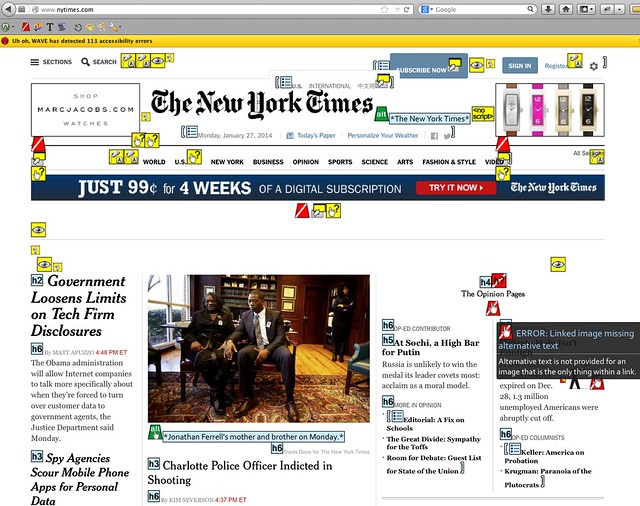
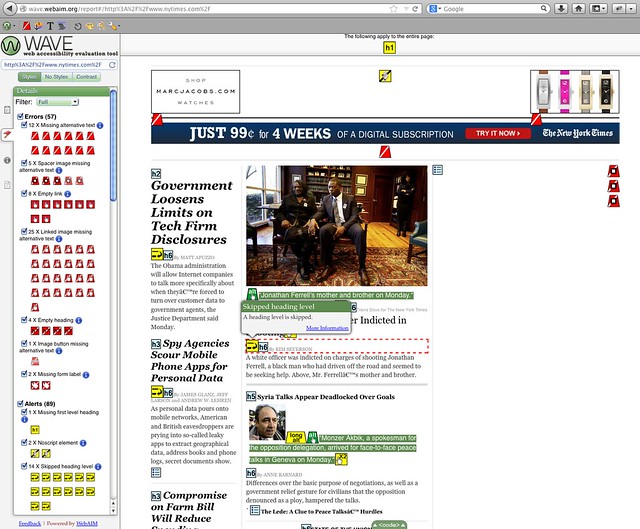
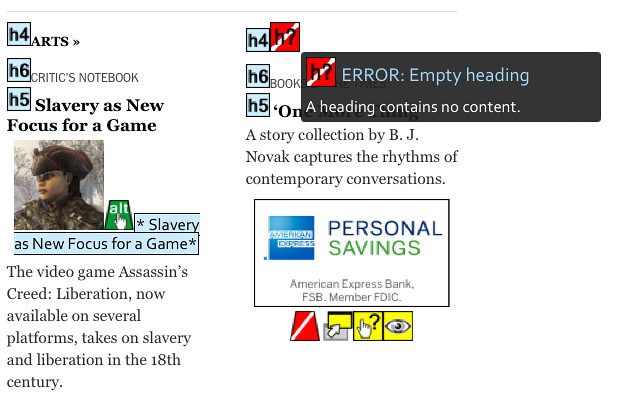
On Wednesday (January 8, 2014), the new New York Times redesign went live, and everyone was raving how lovely it was from a design, content, and responsive web design perspective. No one was talking about how accessible the new redesign was. On Wednesday morning, I saw Patrick Dunphy’s tweet: “redesigned http://nytimes.com homepage #accessibility quick check w/@WebAIM tools web 59 & toolbar 131 errors #a11y” I’m familiar with the WAVE Toolbar by WebAIM, which is useful for testing behind firewalls or for code found on DEV servers. It’s a free Firefox plug-in and WebAIM’s online checker is useful as well. After seeing that Patrick had run the home page through the WAVE tools, I had to do the same thing myself. And I found that the New York Times had missed a lot of what I thought were easy items, such as missing ALT text, empty or missing headings, missing form LABELs, etc. I was able to confirm Patrick’s findings. On Saturday evening at about 6:30 PM EST with the WebAIM WAVE toolbar, I found 115 errors. The following screenshot shows the results. Some of the problems that the tool identified are:

  • Missing ALT text – red background with white line running through it diagonally
  • Linked image missing ALT text – white hand on the red background
  • Empty heading – an “H” with a question mark on a red background

All screenshots can be enlarged by clicking the images and they were re-taken on January, 27, 2014.WebAIM WAVE toolbar with 115 errors Next, I used the WAVE WebAIM accessibility checker and I found 57 errors and 89 warnings. The following screenshot shows the problems that the tool identified:

Errors

  • Missing ALT text – red background with white line running through it diagonally
  • Linked image missing ALT text – white hand on the red background
  • Empty heading – an H with a question mark (h?) on a red background
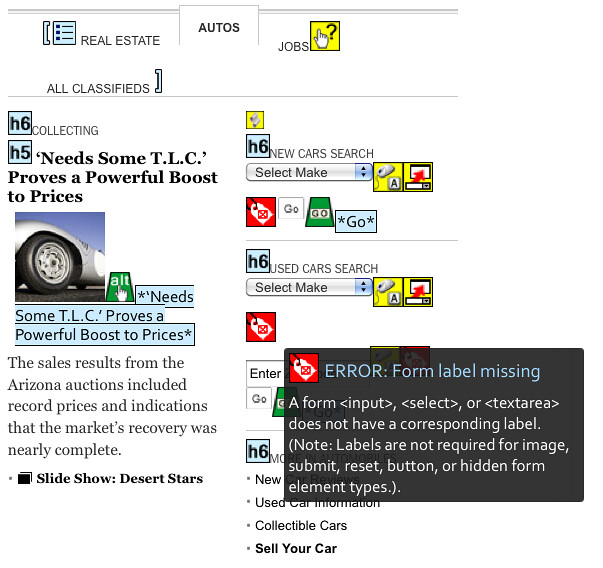
  • Missing FORM LABEL – white gift tag on red background
  • Image button missing ALT text

Warnings

  • Missing first level heading – yellow background with an “H1”
  • Noscript element – paper scroll on yellow background
  • Long ALT text – the word “long ALT” on yellow background

WebAIM WAVE accessibility checker showing 57 errors and 89 warnings Around 2 PM EST Wednesday afternoon, I saw Jeffrey Zeldman’s tweet: “NYTimes redesign has finally gone public. http://www.nytimes.com/redesign/ Content-first, responsive, immersive.” I replied: “hopefully accessibility next? Missing easy stuff? MT @zeldman NYTimes redesign has finally gone public. Content-first, responsive, immersive” And Jeffrey answered: “@jfc3 Can you write a post about the easy things, accessibility-wise, that the otherwise wonderful @nytimes redesign is missing?” So I responded: “sure @zeldman I can write up a blog post over weekend about the easy accessibility updates the new @nytimes redesign should have done. #a11y

Writing an Accessibility Review

My conversation with Jeffrey is why I wrote this blog post after checking the New York Times new redesign for simple accessibility issues. I understand that not all of the home page may have been updated, or parts of the page are being created somewhere else or that they have a bunch of technical debt they have to deal with. I’m trying to use this large public project to show people that, in the real world not everything gets done before you go live. But you still can work on accessibility at any time with some easy-to-use free tools that will get your website or web application closer to being accessible to all. After you fix the issues found with the free tools, you start to worry about using assistive technologies like screen readers (JAWS, NDVA, VoiceOver, etc.), talk-to-type (Dragon Naturally Speaking), text enlargers (ZoomText), etc.

Possible Solutions

The New York Times can make some simple changes to the home page and article pages (future blog post) to make them more accessible to those using assistive technologies or those who only use the keyboard.

Missing ALT Text

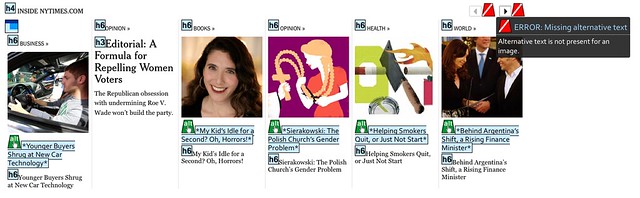
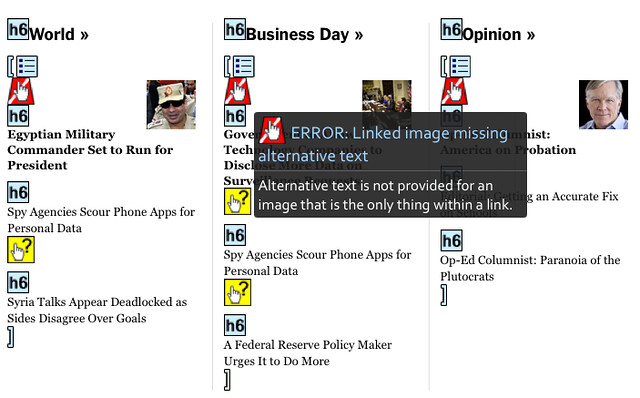
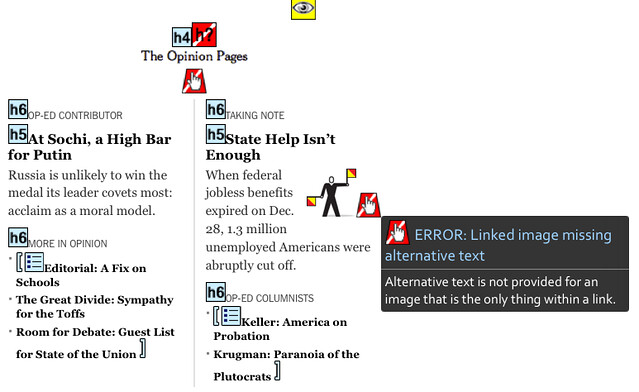
Let’s start with the missing ALT text, which seems to be common in certain sections of the home page, but not in others. If you go to the “Inside NYTimes.com” section, they use the article title as the ALT text, a technique I used to have our developers use for images that link to articles on ARMY.MIL. Missing ALT text for the previous or next buttons in the “Inside NYTimes.com” section In the “Inside NYTimes.com” section, there are no ALT text for the previous or next buttons, which you would think would be useful for those trying to see other items currently listed off screen. When you go to the sections shown below, which are the World, Business Day, Opinion, Technology, etc., there is no ALT text. Look for the white hand on the red background to see which linked images are missing ALT text. Missing ALT text for the images that link to the articles Here is another section (“The Opinion Pages”) of the home page that is missing ALT text, which are links to the articles. Opinion page section with empty ALT text for images that link to same place as the heading level five’s (h5) I’m not sure why they didn’t make the ALT text be the article title as they did in “Inside NYTimes.com” section for the “World, Business Day, Opinion, Technology, etc.” section and the “The Opinion Pages” section.

Empty or Missing Headings Levels

After running both WebAIM tools (WAVE toolbar and online checker), I noticed that the home page had a bunch of headings that were empty. Most of the time, that was because they had created the same heading level just before or after the empty one. Under the main featured article, there is an empty heading level six (H6), which is followed by a heading level five (H5), and then another heading level six (H6). Why not remove the empty heading level six (H6), because it’s making it more difficult for those using screen readers, etc. to understand the page structure and find things on the page? Under the “Arts” section (as mentioned by Sarah Bourne), there is a heading level four (H4), and then there is an empty heading level six (H6) followed by a heading level five (H5). This shows issues with headings because one is empty and another that it is not in proper order, because it goes from H4 to H6 to H5. Empty heading level six (H6) under feature article and incorrect heading order under “Business Day section”

Missing Form LABELs

When you look under the “Auto” and Jobs” tabs of the home page, there are form INPUT fields with missing LABELs. Another interesting part of this is that the text above the INPUT fields is outside the FORM itself. Missing LABELS in Auto Section of New York Times Home Page   The New York Times newly redesigned home page still has some other issues: possible color contrast problems, buttons that are not real buttons (as mentioned by Ian Pouncey), issues with using the keyboard, and screen readers that can’t figure out where a person is on the screen, etc.

Conclusion

I’m going to break this topic into multiple parts. I plan to write about the other accessibility issues found on the home page, about the article pages, which I’m guessing will have similar issues as the home page does, and finally how to use all the tools I used. I hope this post helps you find easy ways to check your websites quickly for accessibility issues, along with pointing out a few free tools you can use. If you have other tools or software that you use to check website accessibility, please add them in the comments, because not all tools will find all the issues.

References

WebAIM

Edited by: Char James-Tanny of JTF Associates, Inc.@CharJTF

Posted in 508 Compliant, Accessibility, Design, FORMs, HTML, New York Times | 4 Comments